MES vs ERP comes down to what each system manages and how detailed its data is.
ERP connects company-wide operations such as orders, purchasing, inventory, and accounting.
MES manages work, progress, quality, and production history on the shop floor.
When the two are integrated, the production plan reaches the shop floor, and actual results flow back to planning and management.
That said, not every factory needs a standalone MES.
The key is to separate the problems your existing ERP can solve from those that need a system built for the shop floor.
This article compares MES and ERP across seven points, then explains how they integrate, walks through a production-flow example, and shows how to decide and where to start.
1. Why do factories confuse MES and ERP?
“ERP already has production management features, so why do we need MES?”
This question comes up in almost every system review for manufacturers.
The reason is that both systems use shared terms such as production orders, production results, and inventory.
But even for a function like “recording production results,” the needs are different.
A planner wants to know how many good units a production order has produced and when it can ship.
A shop-floor leader may need to know which operation has stopped and which material lot is affected.
Many factories already run ERP for orders, inventory, and accounting, while shop-floor data still lives on paper or in Excel.
That gap is usually where MES adds the most value.
Instead of comparing system names, clarify who uses which information, and when.
That makes it much easier to define each system’s role.
2. What is ERP? A system for company-wide resources and transactions
ERP stands for Enterprise Resource Planning.
It connects operations such as orders, purchasing, inventory, manufacturing, sales, and accounting on one consistent set of data.
In manufacturing, ERP is also used for material requirements planning, production orders, finished-goods inventory, and cost management.
Typical questions ERP answers include:
- What should we produce, when, and in what quantity to fill orders?
- When should we purchase which raw materials?
- How much inventory is available to ship?
- Which costs should material and labor results be posted to?
Some ERP products and modules support detailed production control and near-real-time updates.
So it is not accurate to assume that “ERP only processes data once a day.”
What matters is how well the functions you use today meet your actual shop-floor requirements.
3. What is MES? A system for shop-floor execution and production history
MES stands for Manufacturing Execution System.
It supports the execution of work based on production orders and manages operation progress, production results, quality, and materials used.
It also acts as the link between ERP and equipment or control systems.
For example, MES can:
- Show operators the production order and standard work instructions
- Record the start and completion of each operation and the status of work in process
- Link raw material lots to finished-goods lots for traceability
- Record inspection results and defect reasons
- Capture equipment downtime and its causes
Data does not have to come only from automatic collection through a PLC (Programmable Logic Controller) or IIoT (Industrial IoT).
Barcodes, inspection equipment, and operator input are often combined.
Note that MES does not take over all safety control of equipment.
High-speed control and safety functions are generally handled by PLCs or other control systems, so responsibilities between those systems and MES need to be defined clearly.
BAP’s MES and manufacturing execution system support
4. MES vs ERP: seven points compared
The table below compares general roles.
Actual functional scope depends on the product, the modules implemented, and configuration.
MES vs ERP: 7 key differences
| Item |
ERP |
MES |
| ① Primary purpose |
Manages enterprise-wide resources and transactions |
Manages shop-floor execution and production history |
| ② Main scope |
Sales orders, purchasing, inventory, accounting |
Operations, WIP, inspections, work results |
| ③ Information managed |
Production orders, items, inventory, costs |
Operations, lots, individual units, equipment status |
| ④ Update approach |
Updated per business event |
Updated within the delay needed for shop-floor decisions |
| ⑤ Main users |
Management, procurement, production planning, finance |
Production, quality, production engineering, maintenance |
| ⑥ Equipment integration |
Standard functions, extensions, or external integration |
Combines PLCs, IIoT, manual entry, and other sources |
| ⑦ Decision focus |
Can existing functions and settings solve the business problem? |
Do you need execution and traceability at the operation level? |
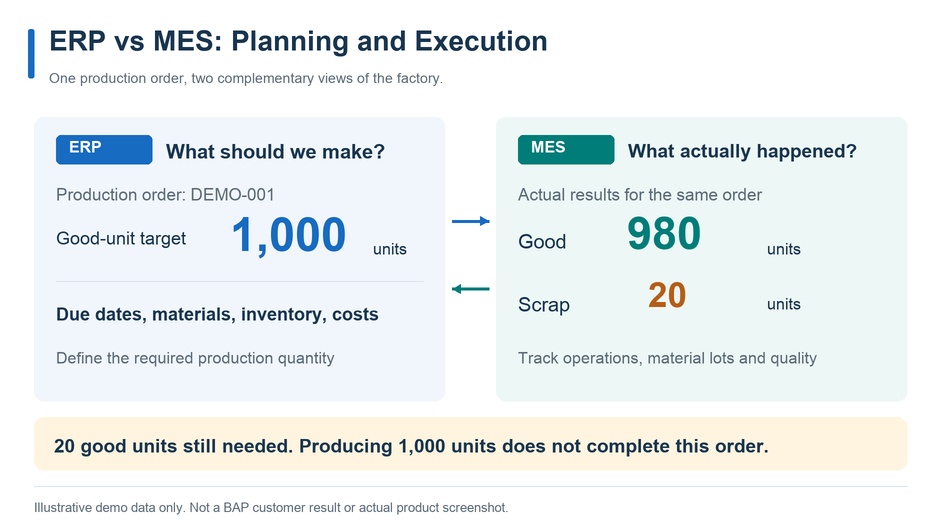
“Real time” also needs to be translated into a concrete requirement.
Detecting an equipment stop and reflecting a finished-goods receipt in the plan tolerate different delays.
Decide “within how many seconds or minutes, who needs to decide what” before choosing an integration method.
5. How do ERP and MES integrate?
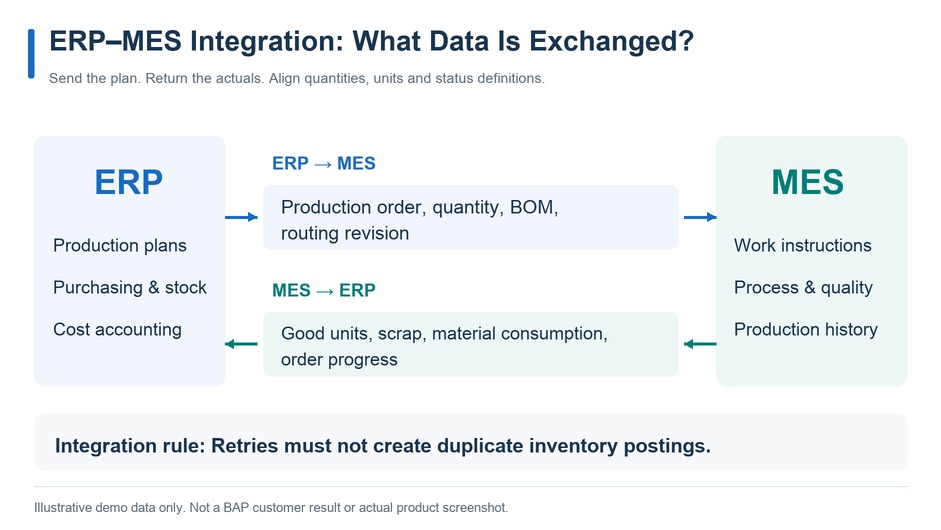
ERP–MES integration needs a design for both flows: sending the plan down and returning actuals.
What ERP sends to MES
Typical data includes the production order number, item, quantity, due date, BOM, and routing.
However, the system of record for BOM and routing differs by company.
Decide which system is authoritative (ERP, PLM, or MES) and use only approved revisions.
What MES returns to ERP
MES returns good quantity, scrap quantity, material consumption, work time, and order progress or completion status.
Here, the key is to align what each quantity means.
Does “output” mean everything that passed through the machine, or only units that passed inspection?
The answer changes how inventory and costs are processed.
Also, a production result sent from MES does not always mean finished-goods inventory can be confirmed.
Define the conditions for posting inventory as a business rule, such as quality disposition, warehouse receipt, and approval.
Role split with WMS and IIoT
WMS (Warehouse Management System) manages storage locations, issues, and receipts of materials and products.
Integrated with MES, it becomes easier to trace which material lot was supplied to which production order.
IIoT collects equipment status and measurements.
Linking that data to production orders and items makes it far more useful for shop-floor improvement.
Related services: BAP’s WMS support / BAP’s industrial IoT and equipment monitoring
6. From production order to finished goods: an example with demo data
Consider a factory that machines parts in a single operation.
The data below is fictional and for explanation only. It is not a BAP customer result or an actual product screen.
To keep the example simple, it assumes no work in process, rework, or inspection holds.
Example production flow
- ERP: issue the production order
Create order “DEMO-001” with a target of 1,000 good units.
- WMS: issue raw materials
Supply raw material lot “RM-DEMO-01” to the order.
- MES: verify before starting
Check the item, material lot, equipment, and routing revision.
- Equipment and MES: process and collect results
Record total output of 1,000 units along with run and stop information.
- MES: confirm quality results
Record 980 good units and 20 scrap units.
- WMS and ERP: receive goods and post results
Receive 980 good units that meet receipt conditions; post scrap and material consumption separately.
At this point, the order is 20 units short of the 1,000-good-unit target.
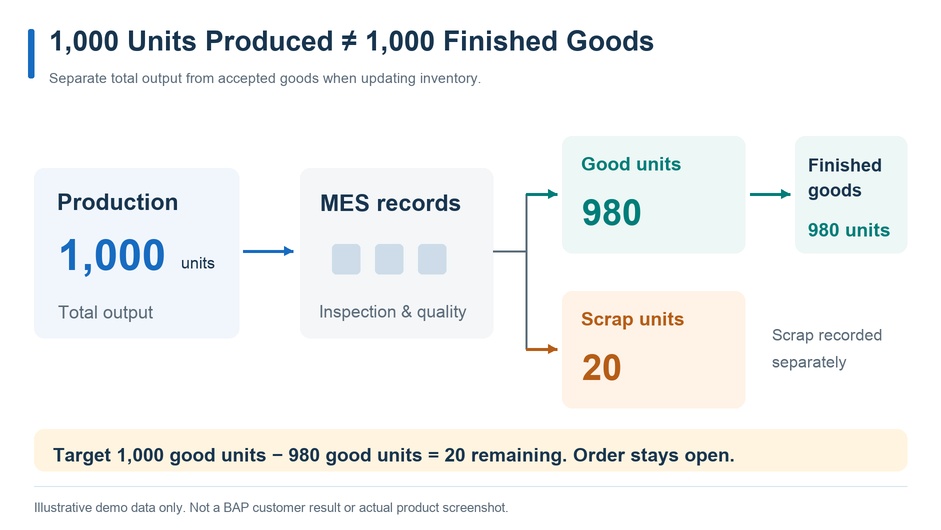
Even with total output of 1,000 units, the order has not produced 1,000 good units.
In this example the order stays open, and the departments involved decide on additional production or a quantity change.
Demo data for the OEE calculation
The figures below are the demo data used for the OEE calculation.
Demo data used for the OEE calculation
| Item |
Demo value |
| Good-unit target |
1,000 units |
| Total output |
1,000 units |
| Good units |
980 units |
| Scrap |
20 units |
| Planned production time |
480 min |
| Downtime |
60 min |
| Run time |
420 min |
| Ideal cycle time |
0.36 min/unit |
* Illustrative demo data only. Not a BAP customer result.
How to calculate OEE
OEE (Overall Equipment Effectiveness) is calculated by multiplying availability, performance, and quality.
Reference: Vorne – How to calculate OEE
- Availability = 420 ÷ 480 = 87.5%
- Performance = (0.36 × 1,000) ÷ 420 ≈ 85.7%
- Quality = 980 ÷ 1,000 = 98.0%
OEE = Availability × Performance × Quality = 73.5%
The calculation uses unrounded values.
The 480 minutes of planned production time in this example excludes breaks when no production is scheduled.
In a real project, align how downtime is recorded, the ideal cycle time, and how rework is treated.
Avoid comparing OEE directly across equipment calculated under different conditions.
7. Architecture: how ERP, MES, PLCs, and equipment connect
Factory systems are easier to understand when split into three roles: company-wide planning, production execution, and equipment control.
ISA-95 is a reference framework for organizing information exchange between enterprise and manufacturing operations.
However, its functional levels are not the same as physical server placement or network design.
Reference: ISA – ISA-95: Enterprise-Control System Integration
In practice, SCADA, IIoT gateways, and integration platforms are combined as needed.
Choosing an integration method
Between ERP and MES, consider APIs, messaging, or file-based exchange.
On the equipment side, protocols such as OPC UA can be used where supported.
Even with MQTT, the meaning of the published data and how it is processed after receipt still need separate design.
What matters is not only that data can be transmitted, but that it is processed correctly as a business transaction.
Design for duplicates, outages, and corrections
Result data should carry the order number, operation number, lot number, and an event ID.
The design must ensure that resending the same data does not double-count inventory or results.
Also decide the following:
- How far can the shop floor keep working during a communication outage?
- Where is unsent data stored?
- In what order is data resent after recovery?
- Who checks receiving errors on the ERP side?
- What history is kept when an incorrect result is corrected?
When connecting IT and OT, also consider network boundaries, access rights, and remote maintenance paths.
8. Which factories need MES?
Once you understand the difference between MES and ERP, judge the need against your own issues.
Cases that point toward MES
- You cannot see progress by order, operation, or lot
- Tracing history from raw materials to finished goods takes a long time
- You need to manage work instructions and inspection conditions per product
- You want to link equipment data to production orders
- Duplicate entry on paper and Excel is a burden on the shop floor
- Customers or audits require lot traceability and quality records
Cases to check in ERP settings and extensions first
- The required function already exists in your ERP but is not being used
- The issue is limited to reports or approval workflows
- Improving data-entry terminals connected to ERP would solve it
- Reviewing current operations would be more effective than adding a new system
Cases where a limited starting point works
If the only goal is to see equipment stops, you can start with equipment monitoring.
If the main issue is copying daily reports, improving data entry and integration may be enough.
Compare MES implementation, ERP extension, and partial app development.
Judge by more than initial cost: include maintenance, updates, integration, and future expansion.
Not sure whether you need MES or an ERP upgrade? Book a free 60-minute consultation with BAP
9. Common mistakes in MES and ERP projects
Leaving master data mismatches for later
If items, units, operations, equipment, and lots are defined differently, the data cannot be aggregated correctly even when systems are connected.
Decide the system of record and the change procedure first.
Mixing up quantities and statuses
Distinguish total output, good units, scrap, held units, and received units.
“Work finished” and “business-complete” are not always the same state.
Testing only the normal flow
Include real-world exceptions in testing: communication outages, result corrections, order changes, material substitutions, and lot splits and merges.
Keeping duplicate entry on the shop floor
If the same information is entered on paper, Excel, ERP, and MES, both the workload and the inconsistencies increase.
List what you will add together with what you can retire.
Treating the dashboard as the goal
Showing numbers does not drive improvement without people and procedures behind them.
Decide who investigates the cause and what changes when stops or defects increase.
10. How to start an MES project: a pre-implementation checklist
You do not need to cover the whole factory from the start.
Narrow the scope to specific orders, operations, and equipment, and plan so that you can compare before and after.
Step 1: Define the process to improve and the metrics
Choose metrics that measure the current state, such as report preparation time, time to reflect results, and history investigation time.
Step 2: Check what your existing ERP can cover
List the options: standard functions, configuration changes, extensions, and external integration.
If you add MES, clarify its role.
Step 3: Pilot with a representative production pattern
Test not only normal production but also defects, corrections, and communication outages.
Set success criteria in advance and evaluate both the effect and the burden on the shop floor.
Step 4: Expand in stages
Prepare the operations owner, training, maintenance, and incident response before widening the scope.
Where equipment and processes differ, separate what can be standardized from what needs individual design.
What to prepare before a consultation
- Your current ERP and the manufacturing functions you use
- The operations that cost the most time or losses
- Target processes, equipment, and the data you can collect
- Forms managed on paper or in Excel
- Requirements for lots, quality, and audits
- Metrics you want to compare before and after
- Business owners and a shop-floor contact
You do not need to have everything decided to begin.
The first step is to separate what you already know from what needs investigation.
11. MES and ERP: frequently asked questions
Do we still need MES if we already have ERP?
Not necessarily, and not every factory needs a standalone MES.
Many issues can be solved with the functions and settings of your existing ERP.
Consider MES when you need progress by operation and lot, traceable production history, or equipment data linked to production orders.
What is the biggest difference between MES and ERP?
ERP manages company-wide resources and transactions such as orders, purchasing, inventory, and accounting.
MES manages work, progress, quality, and production history on the shop floor.
They differ in the business scope they cover and in the granularity of their data.
What does integrating MES with ERP make possible?
ERP sends production orders, items, quantities, due dates, BOMs, and routings down to MES.
MES returns good quantities, scrap, material consumption, work time, and progress to ERP.
It is important to align the meaning of each quantity and the conditions for posting inventory beforehand.
Can a PLC replace MES?
No. A PLC controls equipment, while MES supports work execution based on production orders and manages production history.
Because their roles differ, define responsibilities between them clearly.
High-speed control and safety functions are generally handled by PLCs or other control systems.
Do we have to roll out MES across the whole factory at once?
No. A practical approach is to pilot on a limited set of orders, operations, and equipment.
After evaluating both the effect and the burden on the shop floor, expand in stages.
What should we prepare before talking to an implementation partner?
List your current ERP and the manufacturing functions you use, the operations that cost the most time, target processes and equipment, and forms kept on paper or in Excel.
You do not need everything decided, because gaps can be clarified during the assessment.
12. Conclusion: give MES and ERP clearly separate roles
ERP manages company-wide resources and transactions, while MES manages shop-floor execution and production history.
Not every factory needs a standalone MES.
A practical path is to define the process and metrics to improve, check what your existing ERP can cover, pilot with a representative production pattern, and then expand in stages.
MES or an ERP upgrade? Let BAP help you sort it out
BAP provides system support for manufacturers, including MES, WMS, industrial IoT, and integration with existing ERP.
Support covers current-state assessment, small-scale pilots, staged rollout, and operational support.
BAP’s solutions for manufacturing
Published projects include a steel pipe manufacturing MES and an integrated platform connecting MES, quality, equipment, and management information for a beverage plant.
Use them as a reference when you think through your own requirements and implementation approach.
BAP’s manufacturing system development case studies
Not sure whether you need MES or an ERP upgrade?
Book a free 60-minute factory assessment with BAP.
We will listen to how you manage production today and what problems the shop floor faces, then help you identify what to look at first while making the most of your existing systems.
Book a free 60-minute factory assessment with BAP
* The production quantities, run times, OEE figures, and examples in this article are fictional demo data for explanation.
Actual effects, costs, and timelines vary with the process, equipment, and system architecture.